Automating my mileage log with the BMW CarData API
· Sebastiaan Slootweg · aws, terraform, python, serverless
View the code on GitHubI drive my private BMW for business and claim the kilometres from my own Dutch B.V. That needs a mileage log, which usually means a spreadsheet you fill in by hand and forget about until the end of the month.
So I built km-administratie-bmw. Every hour it reads the odometer and position of the car, turns those readings into trips, sorts them into business and private, and mails me a statement on the first of the month as Excel and PDF. The only thing left for me to do is answer the occasional question, usually with one click.
It's open source under the MIT licence and runs in my own AWS account. The interface and documents are in Dutch, but the ideas below apply to any project built on vehicle data.
The car is the sensor
I looked at the obvious alternatives first and turned them all down:
- Mileage apps mean another subscription, with my location data at a third party.
- Phone geofences can't tell the car apart from any other way of travelling.
- An OBD or GPS dongle was overkill for this.
bimmer_connected, an unofficial client, depends on reverse engineering and runs into captchas at login.- Fixed distances per route miss what really happened, such as a detour around a traffic jam.
BMW now offers an official API, CarData, which exists because of the EU Data Act. It gives me the real odometer value, so the kilometres are exact, and days when the car doesn't move simply don't appear.
Architecture
Everything is serverless and defined in Terraform:
EventBridge (hourly)        -> Lambda poller  -> BMW CarData, then DynamoDB
EventBridge (daily, 20:00)  -> Lambda notify  -> SES mail with open questions
EventBridge (1st of month)  -> Lambda report  -> Excel and PDF, to S3 and SES
Browser                     -> Lambda web     -> server-rendered HTML, no JavaScript
BMW tokens live in Secrets Manager, and CloudWatch alarms mail me when polling fails or too few polls come through. There's no password to manage either: logging in works with a one-time link sent to a fixed address.
Normal use costs a few euros a month at most, and usually less. The two secrets cost about $0.80 a month, and most of the rest stays within AWS's free tier. A budget alert watches the total.
From odometer readings to trips
The core idea is simple. While the odometer doesn't change, the car is parked. Between two parked periods is a trip, and its length is the difference in odometer value.
A simplified example:
| Time | Odometer | Position | Meaning |
|---|---|---|---|
| 07:00 | 32,332 | Home | Parked |
| 08:00 | 32,382 | Client | Arrived, 50 km driven |
| 17:00 | 32,382 | Client | Still parked |
| 18:00 | 32,412 | Somewhere else | Moved on, 30 km driven |
Hourly polling does hide things. Two short stops within the same hour become one trip, but the total kilometres are still correct, which is what the statement depends on. A reading can also arrive mid-drive, so an unknown place only counts as a stop if the car has demonstrably stood still there for at least 10 minutes.
Business or private, and when in doubt
You record your places once: home, clients, the office. After that, one rule shapes everything: a forgotten confirmation must never lead to claiming too much.
- A trip between known business places is compared with the expected distance, which the app learns from your earlier trips. If it's within 15%, it counts as business in full.
- After a large detour, only the expected distance counts as business, and the app asks you to confirm the rest with one click.
- Trips to unknown places, and everything on weekends and public holidays, count as private without a question. The monthly mail lists them, so you can still correct a business trip you forgot about.
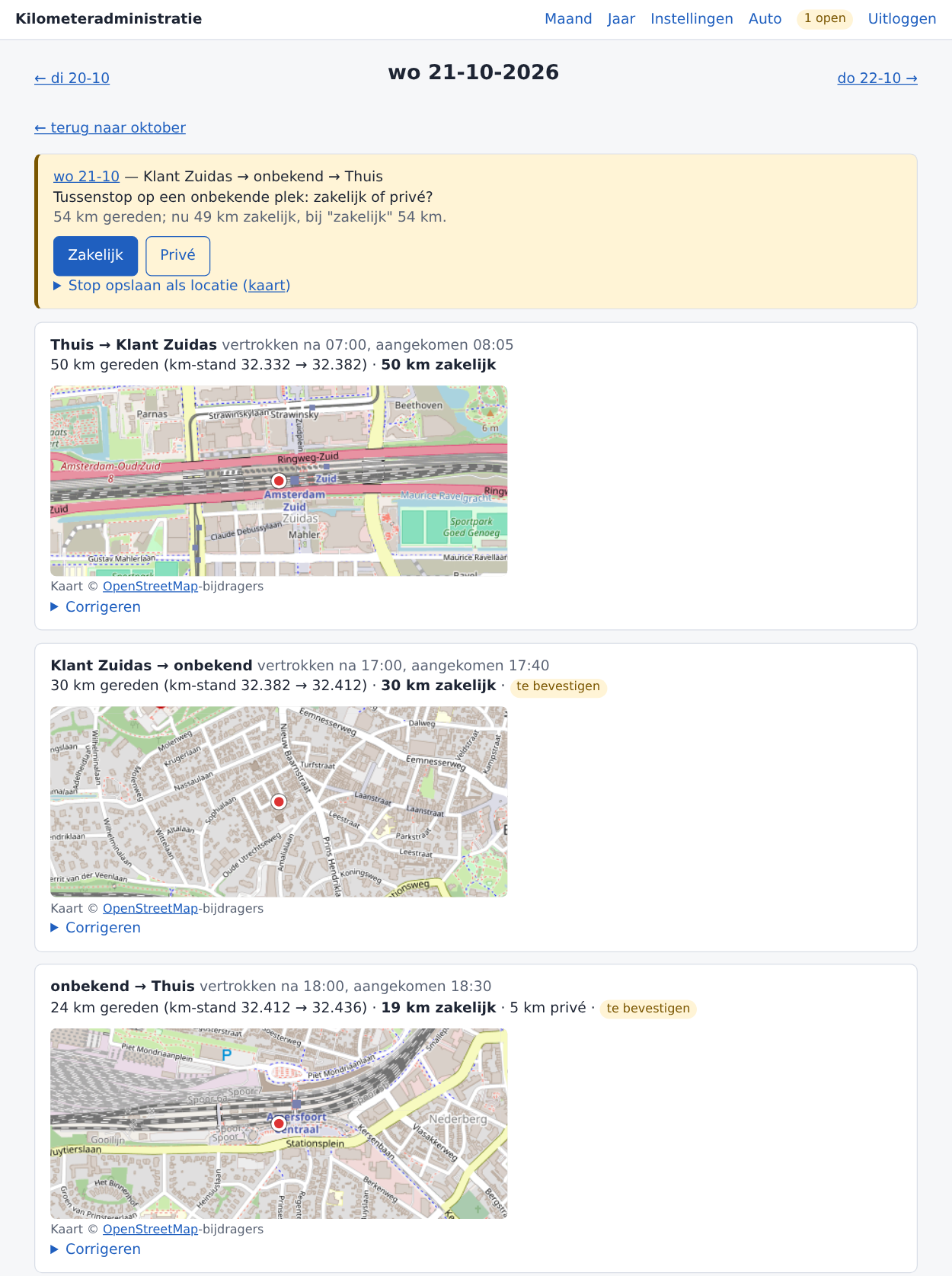
In this example (made-up trips between public places), the car drove 54 km with an unknown stop on the way home. The app counts 49 km as business until I answer.
Answers and corrections are stored separately and reapplied every time trips are recalculated. Trips are derived again each hour, so otherwise every answer would disappear.
What I learned about the CarData API
The official documentation sits behind a login, so I checked my client against three community clients and a real car. A few things are worth knowing if you build on it:
- The quota is tight. You get 50 REST calls per 24 hours, and calls for vehicle mappings and containers count too. The poller stops itself at 40 and doesn't retry, because a missed poll costs less than wasted quota. The next one comes an hour later anyway.
- Refresh tokens rotate. They last 14 days and change on every refresh, so the new token has to be stored immediately, and only one process can own it.
- You need a container first. You register the data points you want once, then read them using that container's ID. Every value comes back as a string.
- There is no history. The REST API only returns the current state, so a missed reading is gone for good. That's why the alarms exist, and why the logic is built around parked periods rather than individual readings.
- Not every field is filled.
vehicle.isMovingand the ignition fields stayed empty, even mid-drive. The logic therefore only uses the odometer, position and timestamps. - Only the primary user gets data. You need to be the main user of the car in the My BMW app.
- Outages happen. I saw BMW's API return 502 errors from a Friday evening until Monday morning. The app can't know what the car did during that time, so it adds at most the expected distance on the day of arrival and asks me by mail to add trips myself.
Keeping it small
A few choices keep the project cheap and easy to maintain:
- Few dependencies. The PDF is written with the Python standard library instead of a PDF package, which keeps the Lambda package at about 1.2 MB.
- Limited deploy rights. The deploy user can only manage
kmlog-*resources, and every role it creates gets a permissions boundary, so it can't gain extra rights through a Lambda. - Safe rollbacks. Each release is a git tag plus a build, and
scripts/deploy.sh v0.6.0installs or rolls back to that version. Stored data is only ever extended, so an older version can still read it. - Tested rules. The calculation rules are tested against the example days written out in the design document.
Limitations
It's a personal tool, and it shows. It supports BMW only, with one car and one user per installation, and it needs your own AWS account plus a mail address on a domain you control. Short stops within an hour stay invisible. It also isn't tax advice, so check for yourself that the rate and records meet what your B.V. and the Dutch tax authority require.
The README covers installation, and the design document has every rule and the reasoning behind it. Both are in Dutch.